I am keeping up the habit I picked up recently of writing one post a week on the metro, on my way to work. Today it is another odd topic: how to fool the bad guys.
What this post is about
We are going to see how changing three lines in your web server can confuse an attacker.
Why would I want to confuse an attacker
You may be very proud of your Apache, your Tomcat, your Nginx or whatever you run. But it is still software, and software has bugs.
Even with everything patched and properly configured, you cannot know every attack out there. Least of all the ones that are not public, which are exactly the ones that can catch you.
There is not much you can do about that, beyond mitigating or preventing. So I am suggesting something a bit different: fool whoever tries to attack us.
How do we fool an attacker
There are plenty of ways to do it. Today we will only scratch the surface. The goal is this: when an attacker connects to our web server, make them believe they are looking at a different server than the one we actually have installed.
In other words, swap the web server’s banner for another one.
Sounds silly? Yes, it is. But you will see how well it works.
How do we do it
I will explain it with Nginx, because it is my favourite, but the idea carries over to any other server. Let’s get to it.
First we install the nginx-extras package:
sudo apt-get install nginx-extras
Then we add this to the Nginx configuration file:
# vim /etc/nginx/nginx.conf

http {
    ...
    server_tokens off;
    server_name_in_redirect off;
    more_set_headers 'Server: Microsoft-IIS/8.5';
    ...
What did we just do
We told the server to replace the Server header it returns to the user with the one we specified.
And here comes an important detail: what value do we put there?
There is no exact answer. My advice is that, if you want to fool a “bad guy”, you build a plausible lie. When they analyse your server, what they see has to be believable.
And how do we make it believable? Easy.
The first thing any attacker will use to identify your systems is nmap, right? So if we manage to fool nmap, odds are we fool the “bad guy” too.
How nmap identifies us
It may not look like it, but fooling nmap is very easy.
The network side is a bit more complex, true. But identifying the services behind each port is done, almost entirely, with plain regular expressions.
Nmap has a database of those expressions. All we need is for our banner to match one of them on port 80 or 443. Looks easier now, right? :)
If you look closely, the banner I picked above matches one of the expressions in that database:
(5070) match http m|^HTTP/1\.1 400 .*\r\nServer: Microsoft-IIS/(\d[-.\w]+)\r\n| p/Microsoft IIS httpd/ v/$1/ o/Windows/ cpe:/a:microsoft:iis:$1/ cpe:/o:microsoft:windows/a
In nmap 7.01 that expression is on line 5070.
You can find the file here:
Mac:
/opt/local/share/nmap/nmap-service-probes
Kali Linux:
/opt/share/nmap/nmap-service-probes
Demo
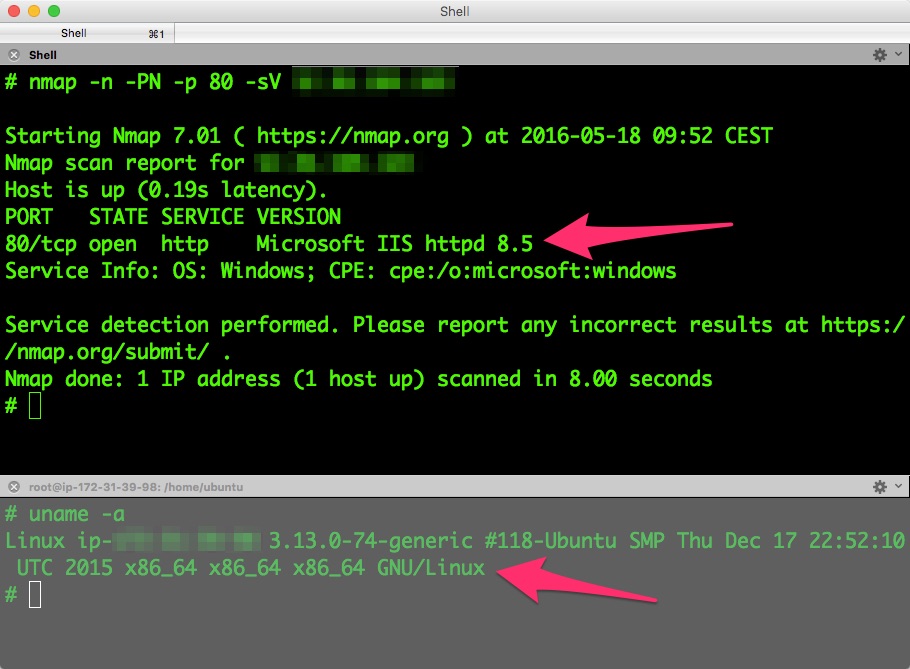
I do not know about you, but I do not believe anything I cannot check :) And in this case, checking is very simple. One nmap against our server’s port and…
Conclusions
A couple of things to wrap up:
- These techniques are called anti-fingerprinting techniques.
- We used nmap in this example, but I encourage you to try Nessus, OpenVAS or similar. You will see how they aim their tests at the server you told them about, so the results they produce will make no sense at all.
I will keep sharing more simple anti-fingerprinting techniques. You will see that fooling the bad guys is not that hard :)
Bye!