
Handling sensitive data is part of the job. It is also, more often than it should be, a pain.
This post covers what a secure secret storage is and a lightweight way to get one for local scripts and small setups, without standing up a server.
TL;DR: what a secure secret storage is
A vault is a secure store for sensitive data: passwords, access tokens, API keys and so on.
You will also see it called a secret manager.
Every major cloud provider has one:
- AWS: AWS Secrets Manager
- Google Cloud: Google Cloud Secret Manager
- Azure: Key Vault
There are open source options too. The best known is Hashicorp Vault.
All of the above are client-server. That is fine, and for a production system it is what you want. But sometimes you need something lighter. A script on your laptop does not deserve a Vault cluster.
This library, in a few words
With keyring you can store sensitive data safely from Python.
The trick is that it does not store anything itself. It hands the data over to the operating system’s own secure storage.
Some examples
Say we want to store our Postgres credentials with this library:
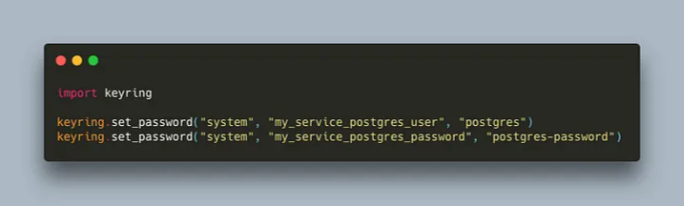
Now we want to use those credentials in a script that connects to a PostgreSQL database.
First, install the PostgreSQL driver:
> pip install "psycopg[binary]"
Then connect:
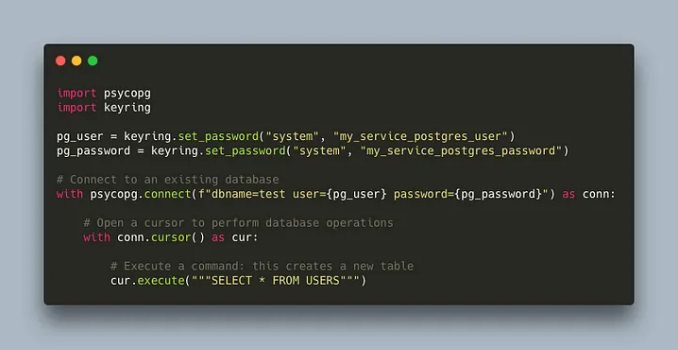
That is it.
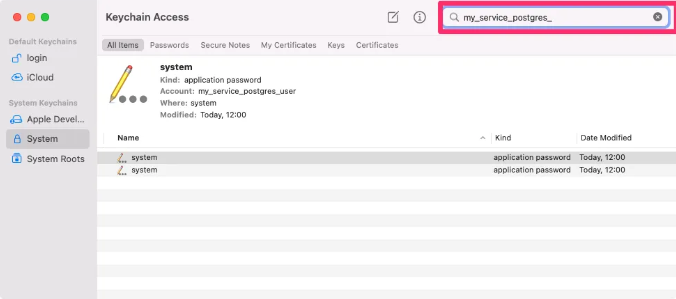
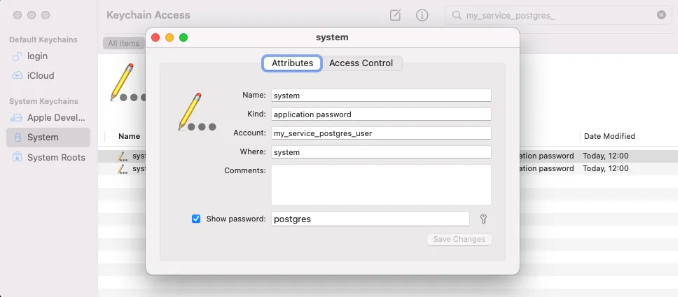
Last thing: check that the secrets did go to the operating system’s secure storage. I am on OS X, so they show up in Keychain Access:
The code from the examples is in my GitHub repo for Medium posts:
https://github.com/cr0hn/my-medium-posts-resources/tree/main/WonderfulLibraries/post-2