
There is plenty written about Docker security and how to write a secure Dockerfile. A quick search gives you tips and best practices for days.
Fine. But there is still one big problem nobody solves in those posts: how do you automate the check?
Steps for building a Docker image
Building a Docker image takes two steps:
-
Write the Dockerfile.
-
Build the image from that Dockerfile.
This post covers the first one, the content of the Dockerfile. Security checks for built images will come in a later post.
Automating security checks for Dockerfiles
Security teams are usually short on people. So the only realistic way to get security into the development pipeline is to automate it.
It does not matter which pipeline you run (Jenkins, Bamboo, GitHub Actions, GitLab pipelines, Bitbucket pipelines…). The idea is always the same: if a critical issue shows up in the Dockerfile, the build stops.
At this point you would normally go to GitHub and start hunting for a tool that checks Dockerfiles automatically. No need. I did it for you.
The two most interesting ones I found:
-
Hadolint: https://github.com/hadolint/hadolint
-
Dockerfile-security: https://github.com/cr0hn/dockerfile-security (spoiler: I wrote it)
Let’s look at both.
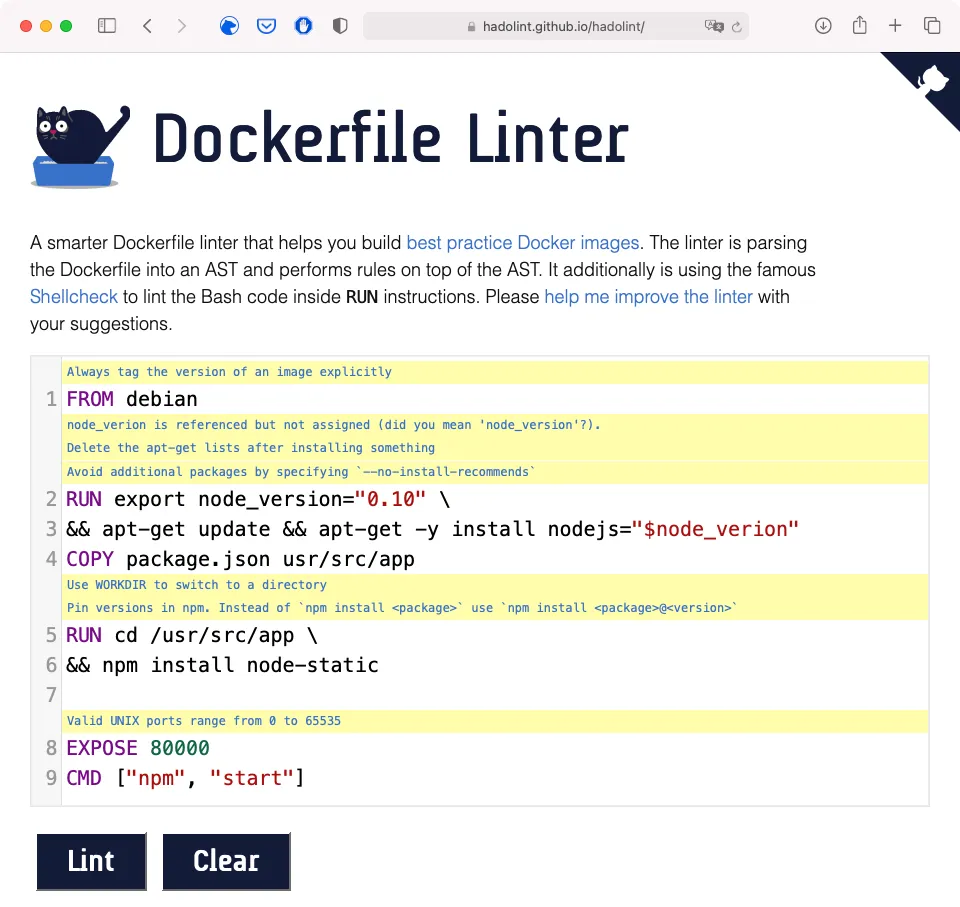
Hadolint
Hadolint is a really nice tool. It is rule based and ships with a lot of built-in rules, and not only for security.
It is a single binary, very fast, written in Haskell. It also has plenty of options to customise the analysis.
The project has an online version, so you can try it without installing anything:
Dockerfile-security
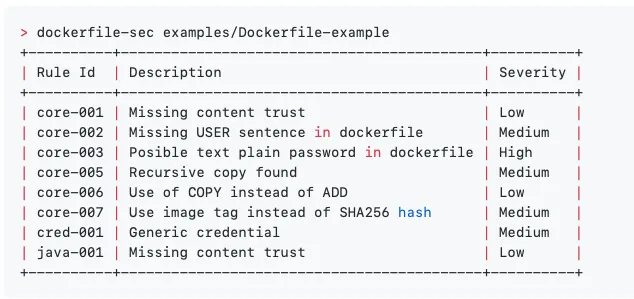
Dockerfile-security is less ambitious than Hadolint. It is simpler, and it was designed from the start to run inside a CI (Continuous Integration) system.
The focus is security. Like Hadolint, it is rule based. It is fast too, written in Python, and you install it with pip.
It comes with some generic built-in rules (the core rules) and others for specific scenarios (Java specific rules, for example).
Hadolint vs Dockerfile-security
Each has its strengths and its weak spots.
Hadolint pros
-
A wide set of built-in rules, not only for security.
-
Standalone binary.
-
Very fast.
-
Friendly feedback for the issues it finds.
-
Online version.
Hadolint cons
-
It is written in Haskell, so if you need a new rule you have to write it in Haskell and recompile the tool.
-
There is no option to export results in a parseable format, like JSON or XML.
Dockerfile-security pros
-
Focused on security.
-
Focused on DevSecOps.
-
Very fast.
-
Friendly feedback for the issues it finds.
-
Adding new rules is easy. Rules are plain YAML files.
-
Rules can be fetched from remote sites, just give it the full URL.
-
Results can be exported as a JSON file.
Dockerfile-security cons
-
Rules are simpler than Hadolint’s.
-
It is not a standalone binary.
Which one, Hadolint or Dockerfile-security?
There is no right answer. It depends on what you need:
-
If you want more than security rules, Hadolint is a good option.
-
If you need your own custom rules, Dockerfile-security is the better choice.
And there is a third option: why limit yourself to one? Both are fast and easy to plug into a pipeline. So… why not run both?
More posts in the DevSecOps series
DevSecOps series No. 1 — Breaking the CI/CD by using evil Git repositories
DevSecOps series No. 3: Old-fashioned issues in DevOps, zip bombs
DevSecOps series No. 4: Protecting environment variables in the most well-known CI systems